Showing posts with label to. Show all posts
Showing posts with label to. Show all posts
Way to Jailbreak iPhone 4 On iOS 5 1 With Redsnow Mac OS X
Friday, March 14, 2014

This tutorial will help you to jailbreak your iPhone 4 using Redsnow . First of all i tell you that it is tethered jailbreak so you have to connect your iPhone with Mac computer and re-run redsnow to boot your iPhone 4 into fully operational state every time your iphone loses power. I am also telling you that this jaolbreak will not work on iPhone 4S and that iBooks will not work correctly until iPhone Dev-Team implement a patch that will fix this.
To jailbreak follow these steps .
Step 1: To get started you will need to( download RedSn0w 0.9.1
0b6) on your Mac
Step 2: Once download process is completed start RedSn0w 0.9.10b6 launcher and click Jailbreak button located in middle of your window
Step 3: When the next window shows up, connect your iPhone 4 with your Mac using USB cable and power off your iPhone.
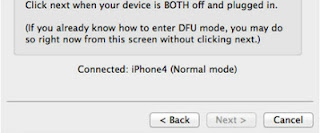
Step 4: When you are ready click Next button in existing window which will start DFU mode process
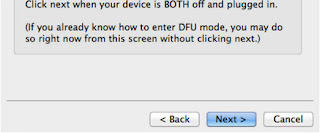
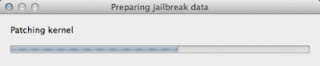
Step 5: When you click Next button simply follow instructions inside redsn0w window and continue clicking Next, after every step you perform on your iPhone (those steps you can find below)
- Hold down the Power (corner) button for 3 seconds
- Without releasing the Power button, also hold down the Home (bottom center) button for 10 seconds
- Without releasing the Home button, release the Power button BUT KEEP holding the Home button for 15 seconds
Step 6: After you have successfully entered in DFU mode with your iPhone 4, redsn0w will begin preparing your iPhone 4 for the Jailbreak
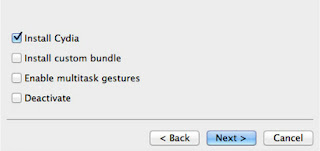
Step 7: Once redsn0w is finished preparing your iPhone 4 for Jailbreak a new window will show up where you need to specify options to go along with Jailbreak. You can specify any option you want but I suggest you to choose only Install Cydia and click Next
Step 8: Once you click next the Jailbreak process will begin, DO NOT interrupt this process and wait until it’s finished. When jailbreak process is finished iPhone will boot up and stuck at Apple logo. If this happens to you it’s because this is a tethered jailbreak and you will need to boot tethered with redsn0w in order to make your iPhone work.
Step 9: To boot your iPhone using redsn0w lunch redsn0w again and click Extras button and then choose Just bootbutton
Step 10: After that you will simply need to put your iPhone into DFU mode again.

Trick To Increase Printing Speed OF Your Printer
Wednesday, February 26, 2014

You can improve the printing speed of your printer with managing the print spooler option. Basically printer spooler holds your prints for some time then send to printer for print out. By default on most printers, printer spooler option is enabled but you can turn it off to specify that the file should be sending to the printer and not spooled.
Here printer spooler option might be at different location in your printer but on most printers you can turn off by going to Start, Settings then Printers. Now right click on the icon of the printer that you are using. Click Properties and select the Advanced tab. Here click on Print directly to printer option. This will tie up your application until the printer has all the data, but your print job should finish more quickly. Printing directly to the printer will also come in handy if your print spooler crashes and you need to print before you reboot your PC.
How To Repair Your USB Drive
Thursday, February 13, 2014

This trick will show you how to fix your not working USB Flash. I have tested it myself and then shared this trick.
Instructions:
- Download THIS FILE
- Now Extract it and You will see the .exe file and Run it as shown below.

- When you open it then 1st Select your USB drive and then Select Non-Active option it is important and finally click on Format button.

- After that you will see a dialog and click on Yes button as shown below.

- After Process Completed then click on Done button so you are done…

- At Last Remove your USB from Computer and Insert again you will see that it Problem will be fixed.
- IMPORTANT NOTE: Your USB data will be lost so 1st backup it if it have.
iphone and ipod touch disabled or to remove passcode
Monday, February 3, 2014
how? follow steps carefully..
1.download iphone browser here! http://www.mediafire.com/file/mfzgzmzjz55/SetupiPhoneBrowser.1.81.rar
2.install iphone browser
3.connect iphone to computer
4.open your iphone bowser and navigate to var folder

5.open var folder and navigate to keychains

6.open keychains folder and delete keychain-2.bd file

7.DONE!
8.reboot iphone passcode or disabled massage should be gone..
1.download iphone browser here! http://www.mediafire.com/file/mfzgzmzjz55/SetupiPhoneBrowser.1.81.rar
2.install iphone browser
3.connect iphone to computer
4.open your iphone bowser and navigate to var folder
5.open var folder and navigate to keychains
6.open keychains folder and delete keychain-2.bd file
7.DONE!
8.reboot iphone passcode or disabled massage should be gone..
Nokia Lumia 920 Resetting
Monday, December 23, 2013
Unfortunately Windows Phone 8 is turning out not to be half as stable as Windows Phone 7.5. Spontaneous soft resets (which seems to affect about 20% of our readers) are one thing, but when my new Nokia Lumia 920 ended up frozen and unresponsive on the boot-up screen I got a bit scared, especially due to all the stories of bricked phones. The issue seems pretty common also, with all three WMPU editors who have Nokia Lumia 920s having their phones freeze. Of course without a removable battery a quick battery pull will not save you.
If this should happen to you (which anecdotally seems likely) to soft reset the Nokia Lumia 920 press and hold the power button and volume down button for about 10 seconds will do the trick; the phone should vibrate and reboot your phone.
If this fails a hard reset is the next step, but be warned that this is where the reports of bricking have come from. To hard reset hold the volume down, power button and camera button until the phone vibrates, then release the power button and keep the volume down and camera button down for another 5 seconds.Your phone should then reset to factory state.
If your phone does get bricked here is a procedure that may salvage it, but it may be much more reliable and better to simply return the handset.
How to enter the Unlocking Code for a Pantech Model phone
Saturday, December 7, 2013

Option 1 - Pantech Models
1. Turn on your phone with an original SIM Card in it
2. Type the following: * # 8 6 5 6 2 5 #
3. A SIM Unlock Menu will appear, press Ok
4. Enter Unlock Code + * (8 digit code)
5. Re-enter Unlock Code + * (8 digit code)
6. The phone will display Unlock Process Complete
7. Press Ok
7. The phone is now unlocked.
2. Type the following: * # 8 6 5 6 2 5 #
3. A SIM Unlock Menu will appear, press Ok
4. Enter Unlock Code + * (8 digit code)
5. Re-enter Unlock Code + * (8 digit code)
6. The phone will display Unlock Process Complete
7. Press Ok
7. The phone is now unlocked.
Option 2 - Pantech Models
1. Insert a not accepted SIM Card and turn the phone on2. When prompted, enter the unlocking code provided
(Note: Use the onscreen keyboard and make sure that wireless mode is off)
3. Your phone will now be unlocked.
Option 3 - Pantech Models
1. Insert an non-accepted SIM Card and turn ON your phone2. A hidden Sim Unlock Menu will appear
3. Enter the Unlock Code provided
4. The phone will display the message Unlock Process Complete
5. The phone will now be unlocked.
Samsung Glaxy Ace 3 GT S7272 Reset To Default Settings
Wednesday, December 4, 2013
Hard Reset Glaxy Ace 3 Gt-s7272
if You Mobile Not Working Normal Condition Slow Speed Hang Problem.You Can Solve Your Problem By Reset Your Mobile.

Reset via Settings menu
- select Apps from home screen or Press Menukey from home screen
- select Settings
- select Accounts
- select Backup & reset
- select Factory data reset
- select Reset device
- select Erase everything
To avoid permanent damage to your device, do not restart your device while a reset procedure is underway.
Warning! All data will be erased from device memory, including system and application data, settings and downloaded applications. Back up your important data. The device will restore to factory settings.
Hard reset via external hardware keys by entering android system recovery
- Turn off the device
- Press dan hold Volume Up button and Power Buttonsimultaneously till the screen turns up and Samsung logo blinks for two times.
- Then release the power key but keep the Volume Up key pressed till you see Android system recovery screen.
- select wipe data / factory reset using Volume Down key to highlight.
- Press home key.
- select reboot system now
- Press home key.
Only do this if you can not do it via Setting menu.
Performing Soft Reset
If your phone or tab hangs or does not responding, try to Press and hold power key about 10 seconds. It will rebooting automatically. Or try to remove and re insert the battery and SIM Card ( If available ).
Chinese Mobile Phones Secret Codes To Reset
Tuesday, December 3, 2013
Chinese Mobile phones are flooding in the market. You get the same exact mobile phones as the branded ones like iPhone clone, HTC Touch clone, Nokia N97 clone, Palm Pre clone. Chinese mobile manufacturers have all the clone mobile phones, you name it and they have it.
If you are one of those users who likes to use Chinese mobile phones, you might some day want to reset your Chinese mobile phones.
So here are the list of secret codes to reset your chinese mobile phones.
*#66*# Set Factory Mode CONFIRMED
*#8375# Show Software Version CONFIRMED
*#1234# A2DP ACP Mode CONFIRMED
*#1234# A2DP INT Mode CONFIRMED
*#0000# + Send : Set Default Language CONFIRMED
*#0007# + Send : Set Language to Russian CONFIRMED
*#0033# + Send : Set Language to French CONFIRMED
*#0034# + Send : Set Language to Spanish CONFIRMED
*#0039# + Send : Set Language to Italian CONFIRMED
*#0044# + Send : Set Language to English CONFIRMED
*#0049# + Send : Set Language to German CONFIRMED
*#0066# + Send : Set Language to Thai CONFIRMED
*#0084# + Send : Set Language to Vietnamese CONFIRMED
*#0966# + Send : Set Language to Arabic CONFIRMED
*#800# make Etel E10 model displaying message BT power on. But on display it dont resemble the blutooth power on icon.(actually t makes BT stuck, but after restarting t becomes normal <tested by me>)
More codes to reset chinese mobile phone
*#77218114#
*#881188#
*#94267357#
*#9426*357#
*#19912006#
*#118811#
*#3646633#
also found these
Service codes Konka:
C926 software version: *320# Send
C926 set default language: *#0000# Send
C926 set English language: *#0044# Send
Service codes GStar:
GM208 (Chinese Nokea 6230+) engineering menu: *#66*#
Set language to English: *#0044#
Set language to Russian: *#0007#
ZTE Mobile:>1- *938*737381#
2- PHONE WILL DIPLAYED DONE
3- POWER OFF YOUR PHONE AND POWER ON AGAIN
alcatel:>E205
unlocking phone code,only press***847# without simcard
E900 software version: *#5002*8376263#
E900 full reset: *2767*3855#
Service codes Spice :
S404 enable COM port: *#42253646633# -> Device -> Set UART -> PS -> UART1/115200
S410 engineer mode: *#3646633#
S900 software version: *#8375#
S900 serial no: *#33778#
Service codes Philips:
S200 enable COM port: *#3338913# -> Device -> Set UART -> PS -> UART1/115200
Service codes "Chinese" models:
default user code: 1122, 3344, 1234, 5678
Engineer mode: *#110*01#
Factory mode: *#987#
Enable COM port: *#110*01# -> Device -> Set UART -> PS Config -> UART1/115200
Restore factory settings: *#987*99#
LCD contrast: *#369#
software version: *#800#
software version: *#900#
Service codes BenQ:
software version: *#300#
test mode: *#302*20040615#
Service codes Pantech:
software version: *01763*79837#
service menu: *01763*476#
reset defaults (phone/user code reset to default): *01763*737381#
Service codes VK-Mobile **x, 5xx:
software version: *#79#
software version: *#837#
service menu: *#85*364# (hold #)
Service codes VK200, VK2000, VK2010, VK2020, VK4000:
software version: *#79#
service menu: *#9998*8336# (hold #)
reset defaults (phone/user code reset to default): *#9998*7328# (hold #)
Service codes LG:
software version: 2945#*#
KG300 NVRAM format: 2945#*# -> menu 15
Service codes Sony-Ericsson:
J100 software version: #82#
Service codes Fly:
M100 software version: ####0000#
2040(i) reset defaults: *#987*99# Send
MX200 reset defaults: *#987*99# Send
MX200 software version: *#900# Send
SL300m reset defaults: *#987*99# Send
SL300m software version: *#900# Send
SL500m reset defaults: *#987*99# Send
SL500m software version: *#900# Send
MP500 reset defaults: *#987*99# Send
MP500 software version: *#900# Send
Set language to English: *#0044#
Set language to Russian: *#0007#
Service codes Konka:
C926 software version: *320# Send
C926 set default language: *#0000# Send
C926 set English language: *#0044# Send
Service codes GStar:
GM208 (Chinese Nokea 6230+) engineering menu: *#66*#
Set language to English: *#0044#
Set language to Russian: *#0007#
Service codes Motofone-F3:
Motofone F3 software version: **9999* Send
***300* Set SIM Pin
***310* / ***311* SIM Pin ON | OFF
***000* Reset Factory settings
***644* Set Voicemail number
***260* / ***261* Auto keypad lock ON | OFF
***510* / ***511* Voice Prompts ON | OFF
***160* / ***161* Restricted Calling (Phonebook only) ON | OFF
***200608* Send: software version
***200606* Send: software version
***200806* Send: flex version
***250* / ***251* Keypad tones ON | OFF
***470* Select time format
***500* /***501* Prepaid Balance Display ON | OFF
***520* Change language
Service codes Motorola:
C113, C114, C115, C115i, C116, C117, C118 software version: #02#*
C138, C139, C140 software version: #02#*
C155, C156, C157 software version: #02#*
C257, C261 software version: #02#*
V171, V172, V173 software version: #02#*
V175, V176, V176 software version: #02#*
C168, W220 software version: *#**837#
W208, W375 software version: #02#*
and "yes"
I-mobile Inno30, 55, 89, 90, 99, 100, A10, A20, P10, Vk200
- Set full factory *741*737381#
- Set full factory *741*7373868#
- Set full factory *741*2878#
- Set Engineer Mode *888*888#
- Check software version *888*837#
I-mobile 100 ,200 , 313
- Check software version #*888#
I-mobile 309, 310
- Check software version *0*4636#
- Test Mode *0*6268#
I-mobile 311
- Check software version #*878#
I-mobile 511
- Check software version *1222*1#
I-mobile 301, 302,308, 508, 601, 602, 603, 604, 606, 611, 901, 902
- Check software version *#159#
- Set Factory Mode *#32787#
- Set Engineer Mode *#3646633#
I-mobile 503, 506, 605, 600, 607, 608
- Set Engineer Mode ***503#
- Set Factory Mode ***504#
- Set Auto Test ***505#
I-mobile 509, 612
- Set Factory Mode *#66*#
I-mobile 504, 505, 803
- Check software version *68*48#
- Set full factory *789#
- Test Mode *#789#
I-mobile 305, 306, 315, 510, 609, 609i,516
- Check software version *#8375#
- Set Factory Mode 878
I-mobile 610
- Check software version *#22#
I-mobile J101, J102
- Test Mode *23638777*783781#
I-mobile 502, 502i, 505, k9, 802
- Check software version *201206*4636#
If you are one of those users who likes to use Chinese mobile phones, you might some day want to reset your Chinese mobile phones.
So here are the list of secret codes to reset your chinese mobile phones.
*#66*# Set Factory Mode CONFIRMED
*#8375# Show Software Version CONFIRMED
*#1234# A2DP ACP Mode CONFIRMED
*#1234# A2DP INT Mode CONFIRMED
*#0000# + Send : Set Default Language CONFIRMED
*#0007# + Send : Set Language to Russian CONFIRMED
*#0033# + Send : Set Language to French CONFIRMED
*#0034# + Send : Set Language to Spanish CONFIRMED
*#0039# + Send : Set Language to Italian CONFIRMED
*#0044# + Send : Set Language to English CONFIRMED
*#0049# + Send : Set Language to German CONFIRMED
*#0066# + Send : Set Language to Thai CONFIRMED
*#0084# + Send : Set Language to Vietnamese CONFIRMED
*#0966# + Send : Set Language to Arabic CONFIRMED
*#800# make Etel E10 model displaying message BT power on. But on display it dont resemble the blutooth power on icon.(actually t makes BT stuck, but after restarting t becomes normal <tested by me>)
More codes to reset chinese mobile phone
*#77218114#
*#881188#
*#94267357#
*#9426*357#
*#19912006#
*#118811#
*#3646633#
also found these
Service codes Konka:
C926 software version: *320# Send
C926 set default language: *#0000# Send
C926 set English language: *#0044# Send
Service codes GStar:
GM208 (Chinese Nokea 6230+) engineering menu: *#66*#
Set language to English: *#0044#
Set language to Russian: *#0007#
ZTE Mobile:>1- *938*737381#
2- PHONE WILL DIPLAYED DONE
3- POWER OFF YOUR PHONE AND POWER ON AGAIN
alcatel:>E205
unlocking phone code,only press***847# without simcard
E900 software version: *#5002*8376263#
E900 full reset: *2767*3855#
Service codes Spice :
S404 enable COM port: *#42253646633# -> Device -> Set UART -> PS -> UART1/115200
S410 engineer mode: *#3646633#
S900 software version: *#8375#
S900 serial no: *#33778#
Service codes Philips:
S200 enable COM port: *#3338913# -> Device -> Set UART -> PS -> UART1/115200
Service codes "Chinese" models:
default user code: 1122, 3344, 1234, 5678
Engineer mode: *#110*01#
Factory mode: *#987#
Enable COM port: *#110*01# -> Device -> Set UART -> PS Config -> UART1/115200
Restore factory settings: *#987*99#
LCD contrast: *#369#
software version: *#800#
software version: *#900#
Service codes BenQ:
software version: *#300#
test mode: *#302*20040615#
Service codes Pantech:
software version: *01763*79837#
service menu: *01763*476#
reset defaults (phone/user code reset to default): *01763*737381#
Service codes VK-Mobile **x, 5xx:
software version: *#79#
software version: *#837#
service menu: *#85*364# (hold #)
Service codes VK200, VK2000, VK2010, VK2020, VK4000:
software version: *#79#
service menu: *#9998*8336# (hold #)
reset defaults (phone/user code reset to default): *#9998*7328# (hold #)
Service codes LG:
software version: 2945#*#
KG300 NVRAM format: 2945#*# -> menu 15
Service codes Sony-Ericsson:
J100 software version: #82#
Service codes Fly:
M100 software version: ####0000#
2040(i) reset defaults: *#987*99# Send
MX200 reset defaults: *#987*99# Send
MX200 software version: *#900# Send
SL300m reset defaults: *#987*99# Send
SL300m software version: *#900# Send
SL500m reset defaults: *#987*99# Send
SL500m software version: *#900# Send
MP500 reset defaults: *#987*99# Send
MP500 software version: *#900# Send
Set language to English: *#0044#
Set language to Russian: *#0007#
Service codes Konka:
C926 software version: *320# Send
C926 set default language: *#0000# Send
C926 set English language: *#0044# Send
Service codes GStar:
GM208 (Chinese Nokea 6230+) engineering menu: *#66*#
Set language to English: *#0044#
Set language to Russian: *#0007#
Service codes Motofone-F3:
Motofone F3 software version: **9999* Send
***300* Set SIM Pin
***310* / ***311* SIM Pin ON | OFF
***000* Reset Factory settings
***644* Set Voicemail number
***260* / ***261* Auto keypad lock ON | OFF
***510* / ***511* Voice Prompts ON | OFF
***160* / ***161* Restricted Calling (Phonebook only) ON | OFF
***200608* Send: software version
***200606* Send: software version
***200806* Send: flex version
***250* / ***251* Keypad tones ON | OFF
***470* Select time format
***500* /***501* Prepaid Balance Display ON | OFF
***520* Change language
Service codes Motorola:
C113, C114, C115, C115i, C116, C117, C118 software version: #02#*
C138, C139, C140 software version: #02#*
C155, C156, C157 software version: #02#*
C257, C261 software version: #02#*
V171, V172, V173 software version: #02#*
V175, V176, V176 software version: #02#*
C168, W220 software version: *#**837#
W208, W375 software version: #02#*
and "yes"
I-mobile Inno30, 55, 89, 90, 99, 100, A10, A20, P10, Vk200
- Set full factory *741*737381#
- Set full factory *741*7373868#
- Set full factory *741*2878#
- Set Engineer Mode *888*888#
- Check software version *888*837#
I-mobile 100 ,200 , 313
- Check software version #*888#
I-mobile 309, 310
- Check software version *0*4636#
- Test Mode *0*6268#
I-mobile 311
- Check software version #*878#
I-mobile 511
- Check software version *1222*1#
I-mobile 301, 302,308, 508, 601, 602, 603, 604, 606, 611, 901, 902
- Check software version *#159#
- Set Factory Mode *#32787#
- Set Engineer Mode *#3646633#
I-mobile 503, 506, 605, 600, 607, 608
- Set Engineer Mode ***503#
- Set Factory Mode ***504#
- Set Auto Test ***505#
I-mobile 509, 612
- Set Factory Mode *#66*#
I-mobile 504, 505, 803
- Check software version *68*48#
- Set full factory *789#
- Test Mode *#789#
I-mobile 305, 306, 315, 510, 609, 609i,516
- Check software version *#8375#
- Set Factory Mode 878
I-mobile 610
- Check software version *#22#
I-mobile J101, J102
- Test Mode *23638777*783781#
I-mobile 502, 502i, 505, k9, 802
- Check software version *201206*4636#
Stream mobile contents to your TV using new Samsung Android App
Thursday, November 21, 2013
Stream mobile contents to your TV using new Samsung Android App
This feature is available only in Samsung Galaxy S II, but will be enabled on other Samsung smart phones soon including Samsung Galaxy Tab.
You need a TV Model greater or equal to LED 7000 from Samsung:
UA46D7000LM
UA55D8000YR
These models are capable of connecting to the the network and the Internet using a wired or WiFi connection and steam content from internet, news, videos or social media whatever it is!

Download Samsung Smart View from Android Market
How to Master Reset Motorola Spice XT300 Hard Reset Motorola Spice XT300
Tuesday, November 19, 2013
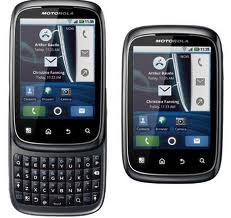
- To perform a Master Reset on your Motorola Spice XT300 reset follow the steps below:
- with the phone off, press the power button and the "X" key on the keyboard
- When the triangle appears press the "alt" and the "w" key on the keyboard
- let the Motorola Spice XT300 reboot and your done!
Micromax A45 Hard Reset to Unlock User setting and DATA

> you will see 2 options (recovery mode / Factore mode) press volume up to select recovery mode
> select wipe data/ factory reset by volume down button then touch menu
> volume down to select yes--delete all user data then touch menu
> reboot system now
Subscribe to:
Posts (Atom)


