Showing posts with label samsung. Show all posts

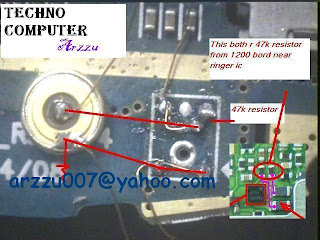
Samsung C3010S Mic Not Working Solutions Jumpers

Thursday, March 13, 2014

Samsung C3010S Mic Not Working Solutions Jumpers
Samsung C3010S Mic Not Working Solutions
Samsung C3010S Mic Not Working Problem
Read More..

Samsung Galaxy TAB GT P1000 Hard Reset and Factory Reset

Saturday, December 21, 2013

To Reset the Phone:

  • Select Settings
  • Select Privacy
  • Select Factory Data Reset
  • Then select Reset Tablet


To Hard Reset:
  • Turn the Samsung Galaxy TAB GT-P1000 Power OFF
  • Press and Hold the Volume Down and Briefly press the Power button.
  • Release the Power button button when the Samasung logo appears.
  • An additional menu will appear, just follow the whole instruction to hard reset the device.
  • The device will then reboot, after this process been done and back to its original factory default settings.
Read More..

Samsung E2121b Mic Ways Jumper

Saturday, December 14, 2013

Samsung e2121b Mic Jumper Solution
Read More..

Samsung c5212 Mic Ways Jumper

Wednesday, December 11, 2013

Samsung C5212 Mic Not Working Solution 
Read More..

Samsung E380 Charging Ways Jumper Solution

Tuesday, December 10, 2013

Samsung E380 Charging Ways Jumper Solution
Read More..

Samsung 18150 Hard Reset Solved Too Many Pattern Attemps Problem Solution

Monday, December 9, 2013

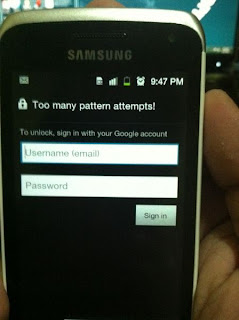
Samsung Galaxy Wonder I8150 correct way for Hard Reset Problem: Too many pattern attempts.

Procedures:

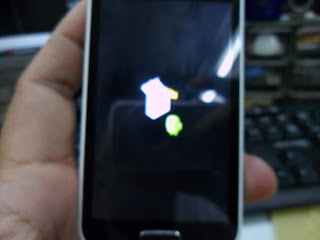
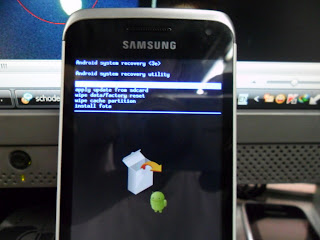
* Press and Hold "volume Up" and "Home" buttons and press power on, wait until the screen display like this.

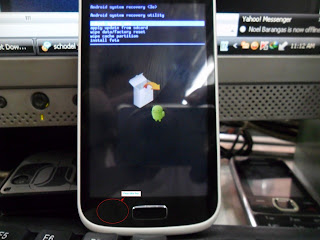
* Press "left soft" key to display "Android System Recovery Utilities"
* Select "wipe data/factory reset" by pressing "volume down" key
* Press "Home" button to select.
* Press "Volume Dow" key to select "Yes"
* Press "Home" button again and wait until finished


You are now completely reseted the phone back into his factory settings
Read More..

Samsung Glaxy Tab P1000 Pin Out Chip IC Manual

Samsung:Glaxy Tab P1000 Pin Out Chip IC Manual


Samsung Galaxy Tab 30 Pin Connector Pinout

Pin# Signal to/from device
1 Gnd P
2 Gnd P
3 USB_DP_CON I/O
4 USB_DM_CON I/O
5 IF_CON_SENSE I
6 V_ACCESSORY_5.0V P
7 V_BUS_1 P
8 V_BUS_1 P
9 VOUT_CHARGER P
10 VOUT_CHARGER P
11 no connection
12 no connection
13 ACCESSORY_ID / USB_ID I
14 ACCESSORY_INT I
15 Gnd P
16 Gnd P
17 MHL_DP I/O
18 MHL_DM I/O
19 MHL_ID I
20 IF_RXD I
21 IF_TXD O
22 no connection?
23 AP_TV_OUT O
24 REMOTE_SENSE I
25 no connection
26 no connection
27 EAR_L_CRADLE O
28 EAR_R_CRADLE O
29 3.5_INT_TEST I
30 Gnd P
Read More..

Download Firmware Samsung Galaxy S II T989 For T Mobile Android ICS 4 0 3

Friday, December 6, 2013

Download Firmware Samsung Galaxy S II T989 For T-Mobile Android ICS 4.0.3

Samsung Galaxy S II T989:T-Mobile Android ICS 4.0.3

DOWNLOAD

Read More..

Samsung E2121b Mic Ways Jumper

Samsung E2121b Mic Ways Jumper

undefined
Samsung e2121b Mic Jumper Solution
Read More..

Samsung S6500 Hard Reset

Wednesday, December 4, 2013

Before Hard Reset Bakup Your Data.
S6500 Hard reset

vol up + vol down + home + power.
Read More..

Samsung Glaxy Ace 3 GT S7272 Reset To Default Settings

Hard Reset Glaxy Ace 3 Gt-s7272 
if You Mobile Not Working Normal Condition Slow Speed Hang Problem.You Can Solve Your Problem By Reset Your Mobile.


Reset via Settings menu
  1. select Apps from home screen or Press Menukey from home screen
  2. select Settings 
  3. select Accounts
  4. select Backup & reset
  5. select Factory data reset 
  6. select Reset device
  7. select Erase everything
To avoid permanent damage to your device, do not restart your device while a reset procedure is underway.
Warning! All data will be erased from device memory, including system and application data, settings and downloaded applications. Back up your important data. The device will restore to factory settings.
Hard reset via external hardware keys by entering android system recovery
    1. Turn off the device
    2. Press dan hold Volume Up button and Power Buttonsimultaneously till the screen turns up and Samsung logo blinks for two times.
    3. Then release the power key but keep the Volume Up key pressed till you see Android system recovery screen.
    4. select wipe data / factory reset using Volume Down key to highlight.
    5. Press home key.
    6. select reboot system now
    7. Press home key.
Only do this if you can not do it via Setting menu.
Performing Soft Reset
If your phone or tab hangs or does not responding, try to Press and hold power key about 10 seconds. It will rebooting automatically. Or try to remove and re insert the battery and SIM Card ( If available ).
Read More..

Samsung Gt s5300 Charging Problem Solution

Tuesday, December 3, 2013

Samsung Gt-s5300 Charging Problem Solution

undefined
Samsung gt-s5300 Charging ic Problem
Samsung gt-s5300 Not Charging
Read More..

Samsung S6500 Hard Reset

Wednesday, November 27, 2013

Before Hard Reset Bakup Your Data.
S6500 Hard reset

vol up + vol down + home + power.
Read More..

Samsung C3312 Light Problem Solution

Tuesday, November 26, 2013

Samsung C3312 Lcd Light Not Working
Read More..

Samsung 18150 Hard Reset Solved Too Many Pattern Attemps Problem Solution

Monday, November 25, 2013

Samsung Galaxy Wonder I8150 correct way for Hard Reset Problem: Too many pattern attempts.

Procedures:

* Press and Hold "volume Up" and "Home" buttons and press power on, wait until the screen display like this.

* Press "left soft" key to display "Android System Recovery Utilities"
* Select "wipe data/factory reset" by pressing "volume down" key
* Press "Home" button to select.
* Press "Volume Dow" key to select "Yes"
* Press "Home" button again and wait until finished


You are now completely reseted the phone back into his factory settings
Read More..

Stream mobile contents to your TV using new Samsung Android App

Thursday, November 21, 2013

Stream mobile contents to your TV using new Samsung Android App


Yes, finally Samsung made it real. You can watch your videos recorded in your Android phone on your TV! The reverse is also possible, you can watch TV programs on your mobile, also you can use your phone as a remote control. Play your favorite games on your TV, control the game using your phone!

This feature is available only in Samsung Galaxy S II, but will be enabled on other Samsung smart phones soon including Samsung Galaxy Tab.

You need a TV Model greater or equal to LED 7000 from Samsung:

UA46D7000LM
UA55D8000YR

These models are capable of connecting to the the network and the Internet using a wired or WiFi connection and steam content from internet, news, videos or social media whatever it is!

Download Samsung Smart View from Android Market
Read More..

Samsung Glaxy i7500 Hard Reset

Wednesday, November 20, 2013

Samsung Glaxy i7500 Hard Reset

undefined
1 - Hold the Volume key (-) to Low (1) 

2 - Hold the SEND key (button to call) (2) 

3 - Hold the POWER button (3) 

4 - Hold the buttons until expression appears bootmode ... 

5 - Wait until the warning appears (is a red triangle with a fulcrum of a Handheld). 

6 - Hold the Menu button (4) 

7 - Wait until the phone is restarted
Read More..

Samsung NX1000 Mirrorless User Manual Guide

-->

Samsung NX1000 Mirrorless Interchangeable Lens Digital Camera Users Manual (Owners Instruction) - The 10 Smart Filters and added Selective Color function, for example, mean that users can adjust the look and feel of shots as they take them. In addition, NX1000 feature Panorama and 3D Panorama, allowing the whole story to be told in one complete picture. With the Smart Panel, settings and features can be easily accessed and applied, making creative photography easier than ever. You can Free Download Samsung NX1000 Operating Instruction Guide / Owners Manual / Users Manual (PDF format) below.
NX1000 is built-in Wi-Fi connectivity can connect either via a wireless Internet router or directly to another device. This allows users to email images and share them on Facebook straight from the camera, via an internet hotspot. Alternatively, it allows photographers to browse images from their camera directly on a Wi-Fi-equipped AllShare or DLNA enabled television, or via an Android smartphone using Samsungs MobileLink app. At our meeting in Seoul we asked the assembled executives for their vision of what the company is calling its Smart Camera Ecosystem. The NX1000 equipped wit a Smart Link Hot Key for quick data transfer to a tablet or smartphone.
NX1000 provide 1080p Full HD stereo movie recording and the mirrorless CMOS image sensor offers precise auto focus even while you shoot.

NX1000 cameras ultra-high speed Auto Focus that can rival almost any system camera and is core component of the system. The result is a fast and precise AF System that captures lifes fleeting moments. And with a sequential rate of 8fps, capturing fast-moving objects in perfect clarity are no longer a challenge.

Key Features of Samsung NX1000 Mirrorless Interchangeable Lens Digital Camera:
  • 20.3 megapixel APS-C CMOS sensor
  • 3-inch 921k dots LCD display
  • 1920 x 1080 / 30p full HD movie with stereo
  • Optical Image Stabilization
  • Smart Auto 2.0
  • Smart Link Hot Key
  • Built-in Wi-Fi
  • Dual-axis level gauge


Read More..

Samsung S3653 corby Insert Sim solution Jumpering

Sunday, November 17, 2013


  • S3653 InsertSim Solution
  • S3653 InsertSim Problem
  • S3653 InsertSim Ways
  • S3653 InsertSim Ic Ways
  • S3653 InsertSim Solution
Read More..

Samsung c3353 charging Solution

Saturday, November 16, 2013

Samsung C3353 Charging Jeck Point Ways 
Read More..