Showing posts with label reset. Show all posts

Total Reset or Hard Reset Nokia 100

Thursday, January 9, 2014

1.- Basic Reset or Soft Reset Nokia 100

This option restores the .ini files from the ROM.
Does not erase data (photos, videos, documents) or applications from
a third party. Key Code *# 7780 # (click this combination of keys on the
keyboard in the mobile)
2.- Total Reset or Hard Reset Nokia 100

This option restores the original operating system from the ROM.
Formats the C: partition and deletes all data including the memory
card. Key Code *#7370# (click this combination of keys on the keyboard
in the mobile)
Important: To proceed to reset, the battery must be full and the
mobile device connected to the charger. If during the course of reset,
the mobile stop receiving electricity it can ruin the internal flash
memory of the mobile device and stop function.

Nokia 100 specifications

Software platform S30
Operating Frequency Dual-band EGSM 900/1800 or GSM 850/1900
Power management BL-5CB 800 mAh Li-Ion battery
Talk time (maximum): Up to 7.2 hours
Standby time (maximum): Up to 35 days
Display Screen size: 1.8″
Resolution: 128 x 160 pixels
TFT display 65,000 colours
Size: 110 x 45.5 x 14.9 mm
Weight (with battery): 70 g
Volume: 73 cc
Stereo FM radio (87.5-108 MHz/76-90 MHz)
Memory Large Phone book – up to 500 Entries
Large SMS storage – up to 250 entries
Multiple phone books (up to 500 entries in total)
Calendar
Notes
Calculator
Speaking alarm clock
Read More..

Nokia Lumia 920 Resetting

Monday, December 23, 2013

Unfortunately Windows Phone 8 is turning out not to be half as stable as Windows Phone 7.5. Spontaneous soft resets (which seems to affect about 20% of our readers) are one thing, but when my new Nokia Lumia 920 ended up frozen and unresponsive on the boot-up screen I got a bit scared, especially due to all the stories of bricked phones. The issue seems pretty common also, with all three WMPU editors who have Nokia Lumia 920s having their phones freeze. Of course without a removable battery a quick battery pull will not save you.

If this should happen to you (which anecdotally seems likely) to soft reset the Nokia Lumia 920 press and hold the power button and volume down button for about 10 seconds will do the trick; the phone should vibrate and reboot your phone.

If this fails a hard reset is the next step, but be warned that this is where the reports of bricking have come from. To hard reset hold the volume down, power button and camera button until the phone vibrates, then release the power button and keep the volume down and camera button down for another 5 seconds.Your phone should then reset to factory state.

If your phone does get bricked here is a procedure that may salvage it, but it may be much more reliable and better to simply return the handset.

Read More..

LG P705 Pattern Code Unlock Hard Reset

Sunday, December 22, 2013

LG P700 Hard Reset Google Account Remove Tip.
1. When the phone is switched off, press
and hold the Volume down key +
Power key with your left hand.

2. When the LED on the bottom of the phone
lights up, touch and hold the Menu key
with your right hand. You need to do this
immediately, before the screen displays the
LG logo. Make sure your left hand is still
holding the Volume down and Power keys.
Then release the power key at vibration time.

3. When the LG logo is displayed on the
screen, continue to hold the keys for
around 2 seconds, and then release all
them at the same time, before the LG
logo disappears.
Leave your phone for at least a minute while
the hard reset is carried out. You will then be
able to switch your phone back on
Read More..

Samsung Galaxy TAB GT P1000 Hard Reset and Factory Reset

Saturday, December 21, 2013

To Reset the Phone:

  • Select Settings
  • Select Privacy
  • Select Factory Data Reset
  • Then select Reset Tablet


To Hard Reset:
  • Turn the Samsung Galaxy TAB GT-P1000 Power OFF
  • Press and Hold the Volume Down and Briefly press the Power button.
  • Release the Power button button when the Samasung logo appears.
  • An additional menu will appear, just follow the whole instruction to hard reset the device.
  • The device will then reboot, after this process been done and back to its original factory default settings.
Read More..

MOTOROLA DROID X2 HARD RESET

Thursday, December 19, 2013

Motorola DROID X2 (also called Motorola Daytona) Hard Reset to Factory Default Settings.
In this guide we show you how to hard reset the Motorola DROID X2 with step by step instructions. 

Precautions: Performing hard reset process will delete or wipe all data from the. We highly recommend to have a back up copy of all your important files stored on the device.

Motorola DROID X2 Factory/Soft Reset:

On the main Home Screen,
->select MENU
->select SETTINGS-> PRIVACY
->select FACTORY DATA RESET
->select RESET PHONE
->Enter the password
->select ERASE EVERYTHING


If the Motorola DROID X2 is frozen: this may sometimes occurs when running multiple applications and the device become unresponsive, you may fix this by rebooting the device or removing the battery for a while. But if the problem still persist you may need to full factory reset the device. 

Motorola DROID X2 Hard Reset through button combination for sever freezing problem., this will prompt you into recovery mode.

1. Turn the power off or remove the battery and reinsert it back again after a couple of seconds.
2. Press and hold the POWER+CAMERA buttons at the same time
3. Release the Camera button when prompted
4. Press and hold the Volume Down key
5. It will show A yellow exclamation display
6. Select the Wipe data/factory reset (Alt + W) option

Wait til the phone completely reboots. Thats it...

Motorola DROID X2 (Verizon) Hard reset, and restore to factory settings


Heres a step by step instruction on how to hard reset the Motorola DROID X2 with step by step instructions.
Note: We highly recommend to have a back up copy of all your important files stored on the device.Performing hard reset process will delete or wipe all data from the. 

Motorola DROID X2 Factory/Soft Reset:

On the main Home Screen,
1. select MENU
2. select SETTINGS
3. select PRIVACY
4. selectFACTORY DATA RESET
5. select RESET PHONE
6.  Enter the password
7. select ERASE EVERYTHING


If the Motorola DROID X2 is frozen: this may sometimes occurs when running multiple applications and the device become unresponsive, you may fix this by rebooting the device or removing the battery for a while.

Motorola DROID X2 Hard reset through button combination for sever freezing problem., this will prompt you into recovery mode.

1. Turn the power off or remove the battery and reinsert it back again after a couple of seconds.
2. Press and hold the POWER+CAMERA buttons at the same time
3. Release the Camera button when prompted
4. Press and hold the Volume Down key
5. It will show A yellow exclamation display
6. Select the Wipe data/factory reset (Alt + W) option

Wait til the phone completely reboots. Thats it
Read More..

Reset for nokia 5220 XpressMusic

Wednesday, December 18, 2013

1.- Basic Reset or Soft Reset for nokia 5220 XpressMusic

This option restores the .ini files from the ROM.
Does not erase data (photos, videos, documents) or applications from
a third party. Key Code *# 7780 # (click this combination of keys on the
keyboard in the mobile)
2.- Total Reset or Hard Reset for nokia 5220 XpressMusic

This option restores the original operating system from the ROM.
Formats the C: partition and deletes all data including the memory
card. Key Code *#7370# (click this combination of keys on the keyboard
in the mobile)
Important: To proceed to reset, the battery must be full and the
mobile device connected to the charger. If during the course of reset,
the mobile stop receiving electricity it can ruin the internal flash
memory of the mobile device and stop function.
Read More..

Nokia C505 hard reset with buttons / keys

Sunday, December 15, 2013

Nokia C505 hard reset with buttons / keys

1)soft reset
Just dial *#7780#
It will ask you for reset just give the password
Default is 12345 and you are done
2)Hard reset
Just dial *#7370# and do the same as above
3)Hard reset by button combination
i)switch off your phone
ii)press and hold three keys
Green key(call key)+lock button+volume up key and then press switch on button
iii)hold the three keys till your phone switches on and you have successfully done..
Reset the Nokia C505 device
1. Switch off the device. 2. Remove the battery. 3. After a few seconds, re-insert the battery, and switch on the device.

Follow Up
Nokia C5-05 General     2G Network     GSM 850 / 900 / 1800 / 1900
Announced     2011, October
Status     Coming soon. Exp. release 2011, Q4
Size     Dimensions     105.8 x 51 x 13.8 mm, 65 cc
Weight     93 g
Nokia C5-05 Display     Type     TFT resistive touchscreen, 16M colors
Size     360 x 640 pixels, 3.2 inches (~229 ppi pixel density)
- Accelerometer sensor for auto-rotate
- Handwriting recognition
Nokia C5-05 Sound     Alert types     Vibration; Downloadable polyphonic, MP3 ringtones
Loudspeaker     Yes
3.5mm jack     Yes
Memory     Phonebook     Practically unlimited entries and fields, Photocall
Call records     Detailed, max 30 days
Internal     40 MB storage, 128 MB RAM, 256 MB ROM
Card slot     microSD, up to 16GB
Nokia C5-05 Data     GPRS     Class 32
EDGE     Class 32
3G     No
WLAN     No
Bluetooth     Yes, v2.1 with A2DP, EDR
Infrared port     No
USB     Yes, v2.0 microUSB
Nokia C5-05 Camera     Primary     2 MP, 1600x1200 pixels
Features     Geo-tagging
Video     Yes, VGA@15fps
Secondary     No
Features     OS     Symbian OS v9.4, Series 60 rel. 5
CPU     600 MHz processor
Nokia C5-05 Messaging     SMS, MMS, Email, IM
Browser     WAP 2.0/xHTML, HTML, RSS feeds
Radio     Stereo FM radio
Games     Yes + Java downloadable
Nokia C5-05 Colors     Black/Aluminium grey, Black Lilac, White Lilac, White/Graphite grey
GPS     Yes, with A-GPS support; Nokia Maps
Java     Yes, MIDP 2.0
- MP4/H.263/H.264/WMV player
- MP3/WAV/еAAC+/WMA player
- Photo editor
- Organizer
- QuickOffice document viewer
- Voice command/dial
- Adobe Flash Lite 3.1
- Predictive text input
Nokia C5-05 Battery           Standard battery, Li-Ion 1000 mAh (Bl-4U)
Stand-by     Up to 600 h
Talk time     Up to 11 h 30 min
Music play     Up to 35 h
Disclaimer from PricesInPakistan: We can not guarantee that the information on this page is 100% correct(Human error is possible), always visit your local shop for exact prices. We Offer:Mobile Review, Ringtone, Software, Pictures and Prices in Pakistan
Read More..

Nokia 6760 Slide reset

Thursday, December 12, 2013

1.- Basic Reset or Soft Reset for nokia 6760 slide

This option restores the .ini files from the ROM.
Does not erase data (photos, videos, documents) or applications from
a third party. Key Code *# 7780 # (click this combination of keys on the
keyboard in the mobile)
2.- Total Reset or Hard Reset for nokia 6760 slide

This option restores the original operating system from the ROM.
Formats the C: partition and deletes all data including the memory
card. Key Code *#7370# (click this combination of keys on the keyboard
in the mobile)
or
Turn the device off.
Press and Hold “*“+ “3” + Call / Green Keys.
Turn on the device by pressing the on button.
Wait until the Nokia logo appear.
Important: To proceed to reset, the battery must be full and the
mobile device connected to the charger. If during the course of reset,
the mobile stop receiving electricity it can ruin the internal flash
memory of the mobile device and stop function.


Read More..

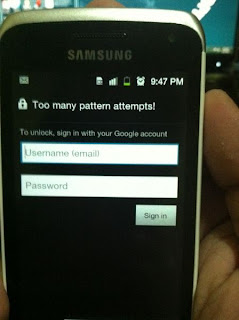
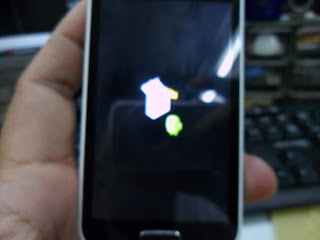
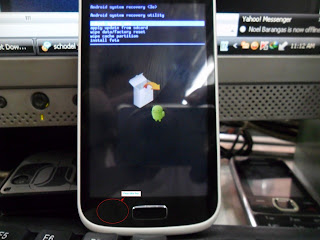
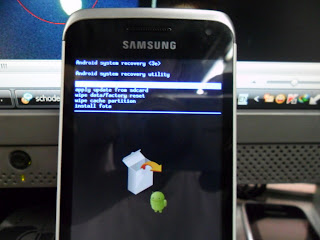
Samsung 18150 Hard Reset Solved Too Many Pattern Attemps Problem Solution

Monday, December 9, 2013

Samsung Galaxy Wonder I8150 correct way for Hard Reset Problem: Too many pattern attempts.

Procedures:

* Press and Hold "volume Up" and "Home" buttons and press power on, wait until the screen display like this.

* Press "left soft" key to display "Android System Recovery Utilities"
* Select "wipe data/factory reset" by pressing "volume down" key
* Press "Home" button to select.
* Press "Volume Dow" key to select "Yes"
* Press "Home" button again and wait until finished


You are now completely reseted the phone back into his factory settings
Read More..

Nokia 5800 xpressmusic reset

Saturday, December 7, 2013

How to hard reset Nokia 5800 Xpress Music?
Please make backup before applying this type of reset, since it will restore the phone’s settings to factory default as well as erasing all the data in the phone memory.

1st option
Soft Reset (when you CAN still use the phones touchscreen)

You need to use the touchscreen dialer to enter these codes:
*#7780# if you want to restore factory settings only and it will NOT delete data.
 *#7370# if you want to reformat your phone and delete all the data in it.
 Press Select.
 Voila, your phone is back to normal.
 Congratulations.

Last option
Hard Reset (if you CANNOT use anymore the phones touchscreen)

You need to use the phones buttons and your 4 fingers to do this trick. 
Switch off the phone. (Remove the battery if you cannot turn it off)
Press the buttons: GREEN + RED + CAMERA + ON simultaneously (DO NOT LET GO OF THE BUTTONS) until you see the “Select Country” option after the Nokias Handshake Welcome Logo appear.
Choose your country, enter the date and time.
Voila, your phone is back to normal.
Congratulations.
Note:
If you were asked for a code, just type: 12345 (unless you change it)
Read More..

Nokia 6120 Resetting

Thursday, December 5, 2013

1.- Basic Reset or Soft Reset

This option restores the .ini files from the ROM.
Does not erase data (photos, videos, documents)  or applications from
a third party. Key Code *#7780# (click this combination of keys on the
keyboard in the mobile)
2.- Total Reset or Hard Reset

This option restores the original operating system from the ROM.
Formats the C: partition and deletes all data including the memory
card. Key Code *#7370# (click this combination of keys on the keyboard
in the mobile)
Important: To proceed to reset, the battery must be full and the
mobile device connected to the charger. If during the course of reset,
the mobile stop receiving  electricity it can ruin the internal flash
memory of the mobile device and stop function.
Read More..

Samsung S6500 Hard Reset

Wednesday, December 4, 2013

Before Hard Reset Bakup Your Data.
S6500 Hard reset

vol up + vol down + home + power.
Read More..

Samsung Glaxy Ace 3 GT S7272 Reset To Default Settings

Hard Reset Glaxy Ace 3 Gt-s7272 
if You Mobile Not Working Normal Condition Slow Speed Hang Problem.You Can Solve Your Problem By Reset Your Mobile.


Reset via Settings menu
  1. select Apps from home screen or Press Menukey from home screen
  2. select Settings 
  3. select Accounts
  4. select Backup & reset
  5. select Factory data reset 
  6. select Reset device
  7. select Erase everything
To avoid permanent damage to your device, do not restart your device while a reset procedure is underway.
Warning! All data will be erased from device memory, including system and application data, settings and downloaded applications. Back up your important data. The device will restore to factory settings.
Hard reset via external hardware keys by entering android system recovery
    1. Turn off the device
    2. Press dan hold Volume Up button and Power Buttonsimultaneously till the screen turns up and Samsung logo blinks for two times.
    3. Then release the power key but keep the Volume Up key pressed till you see Android system recovery screen.
    4. select wipe data / factory reset using Volume Down key to highlight.
    5. Press home key.
    6. select reboot system now
    7. Press home key.
Only do this if you can not do it via Setting menu.
Performing Soft Reset
If your phone or tab hangs or does not responding, try to Press and hold power key about 10 seconds. It will rebooting automatically. Or try to remove and re insert the battery and SIM Card ( If available ).
Read More..

HTC Magic hard reset

Tuesday, December 3, 2013

Resetting the HTC Magic
To reset the HTC Magic phone using phone buttons scroll down 
Resetting the phone deletes all data, including downloaded applications, and the phone back to its initial state, the state before you turned on the phone for the first time.
Important Make sure to back up important data you have on the phone before you perform a factory data reset.


To reset the phone


1. Press HOME > MENU, then touch Settings.
2. Scroll down the screen, then touch SD card & phone storage.
3. Navigate to the Internal phone storage section, then touch Factory data reset.
4. On the Factory data reset screen, touch Reset phone and then touchErase everything.


HTC Magic hard reset

Factory reset using key combination 

To reset the HTC Magic phone using phone buttons

1. With the phone turned offpress and hold the HOME and BACKbuttons.
2. Briefly press the END CALL/POWER button while continuing topress the HOME and BACK buttons.
3. When you see the screen with the 3 Android imagesrelease theHOME and BACK buttons, and then press the TRACKBALL.

Tip If your phone hangs or freezes, remove the battery then wait for a few seconds, and then re-install it. After re-installing the battery, turn on the phone.
Read More..

Chinese Mobile Phones Secret Codes To Reset

Chinese Mobile phones are flooding in the market. You get the same exact mobile phones as the branded ones like iPhone clone, HTC Touch clone, Nokia N97 clone, Palm Pre clone. Chinese mobile manufacturers have all the clone mobile phones, you name it and they have it.
If you are one of those users who likes to use Chinese mobile phones, you might some day want to reset your Chinese mobile phones.
So here are the list of secret codes to reset your chinese mobile phones.
*#66*# Set Factory Mode CONFIRMED
*#8375# Show Software Version CONFIRMED
*#1234# A2DP ACP Mode CONFIRMED
*#1234# A2DP INT Mode CONFIRMED
*#0000# + Send : Set Default Language CONFIRMED
*#0007# + Send : Set Language to Russian CONFIRMED
*#0033# + Send : Set Language to French CONFIRMED
*#0034# + Send : Set Language to Spanish CONFIRMED
*#0039# + Send : Set Language to Italian CONFIRMED
*#0044# + Send : Set Language to English CONFIRMED
*#0049# + Send : Set Language to German CONFIRMED
*#0066# + Send : Set Language to Thai CONFIRMED
*#0084# + Send : Set Language to Vietnamese CONFIRMED
*#0966# + Send : Set Language to Arabic CONFIRMED
*#800# make Etel E10 model displaying message BT power on. But on display it dont resemble the blutooth power on icon.(actually t makes BT stuck, but after restarting t becomes normal <tested by me>)

More codes to reset chinese mobile phone

*#77218114#
*#881188#
*#94267357#
*#9426*357#
*#19912006#
*#118811#
*#3646633#

also found these 


Service codes Konka:

C926 software version: *320# Send
C926 set default language: *#0000# Send
C926 set English language: *#0044# Send

Service codes GStar:

GM208 (Chinese Nokea 6230+) engineering menu: *#66*#
Set language to English: *#0044#
Set language to Russian: *#0007#

ZTE Mobile:>1- *938*737381#

2- PHONE WILL DIPLAYED DONE
3- POWER OFF YOUR PHONE AND POWER ON AGAIN
alcatel:>E205
unlocking phone code,only press***847# without simcard
E900 software version: *#5002*8376263#
E900 full reset: *2767*3855#

Service codes Spice
 :
S404 enable COM port: *#42253646633# -> Device -> Set UART -> PS -> UART1/115200
S410 engineer mode: *#3646633#
S900 software version: *#8375#
S900 serial no: *#33778#

Service codes Philips: 

S200 enable COM port: *#3338913# -> Device -> Set UART -> PS -> UART1/115200

Service codes "Chinese" models:

default user code: 1122, 3344, 1234, 5678
Engineer mode: *#110*01#
Factory mode: *#987#
Enable COM port: *#110*01# -> Device -> Set UART -> PS Config -> UART1/115200
Restore factory settings: *#987*99#
LCD contrast: *#369#
software version: *#800#
software version: *#900#

Service codes BenQ: 

software version: *#300#
test mode: *#302*20040615#

Service codes Pantech:

software version: *01763*79837#
service menu: *01763*476#
reset defaults (phone/user code reset to default): *01763*737381#

Service codes VK-Mobile **x, 5xx:

software version: *#79#
software version: *#837#
service menu: *#85*364# (hold #)

Service codes VK200, VK2000, VK2010, VK2020, VK4000: 

software version: *#79#
service menu: *#9998*8336# (hold #)
reset defaults (phone/user code reset to default): *#9998*7328# (hold #)

Service codes LG:

software version: 2945#*#
KG300 NVRAM format: 2945#*# -> menu 15

Service codes Sony-Ericsson:

J100 software version: #82#

Service codes Fly:

M100 software version: ####0000#
2040(i) reset defaults: *#987*99# Send
MX200 reset defaults: *#987*99# Send
MX200 software version: *#900# Send
SL300m reset defaults: *#987*99# Send
SL300m software version: *#900# Send
SL500m reset defaults: *#987*99# Send
SL500m software version: *#900# Send
MP500 reset defaults: *#987*99# Send
MP500 software version: *#900# Send
Set language to English: *#0044#
Set language to Russian: *#0007#

Service codes Konka:

C926 software version: *320# Send
C926 set default language: *#0000# Send
C926 set English language: *#0044# Send

Service codes GStar:

GM208 (Chinese Nokea 6230+) engineering menu: *#66*#
Set language to English: *#0044#
Set language to Russian: *#0007#

Service codes Motofone-F3:

Motofone F3 software version: **9999* Send
***300* Set SIM Pin
***310* / ***311* SIM Pin ON | OFF
***000* Reset Factory settings
***644* Set Voicemail number
***260* / ***261* Auto keypad lock ON | OFF
***510* / ***511* Voice Prompts ON | OFF
***160* / ***161* Restricted Calling (Phonebook only) ON | OFF
***200608* Send: software version
***200606* Send: software version
***200806* Send: flex version
***250* / ***251* Keypad tones ON | OFF
***470* Select time format
***500* /***501* Prepaid Balance Display ON | OFF
***520* Change language

Service codes Motorola:

C113, C114, C115, C115i, C116, C117, C118 software version: #02#*
C138, C139, C140 software version: #02#*
C155, C156, C157 software version: #02#*
C257, C261 software version: #02#*
V171, V172, V173 software version: #02#*
V175, V176, V176 software version: #02#*
C168, W220 software version: *#**837#
W208, W375 software version: #02#*
and "yes"

I-mobile Inno30, 55, 89, 90, 99, 100, A10, A20, P10, Vk200

- Set full factory *741*737381#
- Set full factory *741*7373868#
- Set full factory *741*2878#
- Set Engineer Mode *888*888#
- Check software version *888*837#

I-mobile 100 ,200 , 313

- Check software version #*888#

I-mobile 309, 310

- Check software version *0*4636#
- Test Mode *0*6268#

I-mobile 311

- Check software version #*878#

I-mobile 511

- Check software version *1222*1#

I-mobile 301, 302,308, 508, 601, 602, 603, 604, 606, 611, 901, 902

- Check software version *#159#
- Set Factory Mode *#32787#
- Set Engineer Mode *#3646633#

I-mobile 503, 506, 605, 600, 607, 608

- Set Engineer Mode ***503#
- Set Factory Mode ***504#
- Set Auto Test ***505#

I-mobile 509, 612

- Set Factory Mode *#66*#

I-mobile 504, 505, 803

- Check software version *68*48#
- Set full factory *789#
- Test Mode *#789#

I-mobile 305, 306, 315, 510, 609, 609i,516

- Check software version *#8375#
- Set Factory Mode 878

I-mobile 610

- Check software version *#22#

I-mobile J101, J102

- Test Mode *23638777*783781#

I-mobile 502, 502i, 505, k9, 802 

- Check software version *201206*4636#
 
Read More..

Soft Reset Nokia 701

Monday, December 2, 2013

1.- Basic Reset or Soft Reset Nokia 701

This option restores the .ini files from the ROM.
Does not erase data (photos, videos, documents) or applications from
a third party. Key Code *# 7780 # (click this combination of keys on the
keyboard in the mobile)
2.- Total Reset or Hard Reset Nokia 701

This option restores the original operating system from the ROM.
Formats the C: partition and deletes all data including the memory
card. Key Code *#7370# (click this combination of keys on the keyboard
in the mobile)
or
Turn the device off.
Press and hold Answer + Reject + Camera keys.
Turn on the devide by pressing the ON button.
Wait until the Nokia logo appear.
Important: To proceed to reset, the battery must be full and the
mobile device connected to the charger. If during the course of reset,
the mobile stop receiving electricity it can ruin the internal flash
memory of the mobile device and stop function. 

Nokia 701 specifications

Developer Platform Symbian Belle
Operating System Symbian OS
Screen Resolution 640 x 360 pixels
Screen Color Depth 24 bits
Screen Size 3.5 inches
Display Technology ClearBlack Corning(r) Gorilla(r) Glass LCD transmissive
Device Size 117.2 x 56.8 x 11 mm
Volume 64 cc
Weight 131 g
Display Touch Technology Capacitive Multipoint-Touch
Input Method Touch Screen
Other Keys ” Call Creation Key Call Termination Key Camera Key Lock Switch Menu Key Power Key Voice Key Volume Keys ”
Frequency Bands GSM 1800 GSM 1900 GSM 850 GSM 900 WCDMA Band I (2100) WCDMA Band II (1900) WCDMA Band IV (1700/2100) WCDMA Band V (850) WCDMA Band VIII (900)
Data Bearers Dual Transfer Mode EDGE Class B EGPRS HSDPA Cat10 14.4 Mbps HSUPA Cat6 5.76 Mbps WCDMA WLAN IEEE 802.11 b/g/n
Regional Availability Global
CPU Count Single CPU
CPU Type ARM 11
CPU Clock Rate 1.0 GHz
Graphics Processor 2D/3D Graphics HW Accelerator with OpenVG1.1 and OpenGL ES 2.0 support
2 Microphones,Accelerometer Sensor Ambient Light Sensor Compass (Magnetometer Sensor) Composite TV Out Flight Mode FOTA Firmware over the Air FOTI Firmware over the Internet Nokia Maps 3.0 Nokia Music On demand Web TV Ovi Store Proximity Sensor Themes
GPS Features A-GPS
Notes 1 For stereo audio recording.
Preinstalled Qt Version Qt 4.7.4
Preinstalled Qt Mobility API Version 1.2.0
Java Runtime Java Runtime 2.3 for Symbian
Java Technology JSR 139 Connected, Limited Device Configuration (CLDC) 1.1 JSR 118 MIDP 2.1 JSR 75 FileConnection and PIM API 1.0 JSR 82 Java™ APIs for Bluetooth 1.1 JSR 172 J2ME™ Web Services Specification 1.0 (RPC package) JSR 172 J2ME™ Web Services Specification 1.0 (XML Parser package) JSR 177 Security and Trust Services API for J2ME™ 1.0 (SATSA-APDU package) JSR 177 Security and Trust Services API for J2ME™ 1.0 (SATSA-CRYPTO package) JSR 177 Security and Trust Services API for J2ME™ 1.0 (SATSA-PKI package) JSR 184 Mobile 3D Graphics API for J2ME™ 1.1 JSR 205 Wireless Messaging API 2.0 JSR 226 Scalable 2D Vector Graphics API for J2ME™ 1.1 JSR 234 Advanced Multimedia Supplements 1.1 (audio3d) JSR 234 Advanced Multimedia Supplements 1.1 (camera) JSR 234 Advanced Multimedia Supplements 1.1 (music) JSR 257 Contactless Communication API 1.0 IAP Info API 1.0 eSWT UI API 1.0.3 JSR 135 Mobile Media API 1.2 JSR 179 Location API for J2ME™ 1.0.1 JSR 211 Content Handler API 1.0.1 JSR 248 Mobile Service Architecture Subset 1.1 for CLDC 1.1 JSR 256 Mobile Sensor API 1.2 JSR-257 Contactless Communication API Extensions Nokia UI API 1.4
Java API Access Permissions Java API Access Permissions
Other APIs OpenGL ES 2.0 OpenVG 1.1
Product ID RM-774: 0x2002BF94
Sensor API Channels Accelerometer Double Tap Accelerometer XYZ Ambient Light Magnetic North Magnetometer XYZ Orientation Proximity Monitor Rotation
Certificates Symbian A, Symbian B, Symbian C, Symbian D, UTI Root
Browser Version “7.4″
Browser Details CSS HTML 4.1 HTML over TCP/IP Javascript 1.8 OSS Browser WAP 2.0 XHTML over TCP/IP XML
Flash Technology Flash Lite 4.0
Flash Lite Features Flash Video
Web Runtime Web Runtime 7.4
Camera Resolution 3264 x 2448 pixels
CMOS Sensor 8.0 Megapixels
Camera Digital Zoom 2 x
Camera F-Stop/Aperture f/2.8
Camera Focus range 50 cm to infinity
Camera Image Formats JPEG/Exif
Camera Features Auto Exposure, Dual-LED Flash, Exposure Compensation, Face Detection, Full Focus, Full Screen Viewfinder, Geotagging, Red-Eye Reduction, Self Timer, Still Image Editor
Video Recording Resolution 1280 x 720 pixels
Video Recording Frame Rate 30 fps
Video Digital Zoom 3 x
Video Recording Formats H.263, H.264/AVC, MPEG-4
Video Features Video Call Video Editor Video Player Video Recorder Video Sharing Video Stabilization Video Streaming
Video Playback Formats 3GPP formats (H.263), Flash Video, H.264/AVC, MPEG-4, RealVideo 10, Sorenson Spark, VC-1, VP6, WMV 9
Video Playback Frame Rate 30 fps
Graphic Formats BMP, EXIF, GIF87a, GIF89a, JPEG, JPEG 2000, MBM, OTA, PNG, TIFF, WBMP, WMF
Audio Features Active Noise Cancellation[1] Audio Equalizer Audio Recorder Audio Streaming Bluetooth Stereo FM Transmitter (88.1 – 107.9 MHz) Handsfree Speaker Loudness Music Player Stereo FM RDS Radio Stereo Widening
Audio Formats AAC, AMR-NB, AMR-WB, eAAC, eAAC+, MIDI, MIDI Tones (poly 64), Mobile XMF, MP3, SP-MIDI, True tones, WAV, WMA
Secondary Camera Resolution 640 x 480 pixels
Secondary Camera F-Stop/Aperture f/2.8
Secondary Camera Image Formats JPEG
Secondary Camera Video Recording Resolution 176 x 144 pixels
Secondary Camera Video Recording Frame Rate 15 fps
Secondary Camera Video Recording Format H.263
Mass Storage Memory 8 GB
ROM Memory 1 GB
RAM Memory 512 MB
Memory Card type Micro SD
Maximum Memory Card Size 32 GB
Maximum Heap Size Unlimited
Maximum JAR Size Unlimited
Local Connectivity Bluetooth 3.0 Bluetooth Stereo Audio Micro USB MTP (Multimedia Transfer Protocol) NFC Nokia AV 3.5mm Nokia Connectivity Cable CA-179 USB 2.0 High-Speed USB Mass Storage USB OTG 1.3
Bluetooth Profiles A2DP, AVRCP, BIP, DUN, FTP, GAP, GOEP, HFP, HSP, OPP, PBAP, SAP, SDP, SPP
WLAN support 802.11b/g/n WEP WPA WPA2 (AES/TKIP)
Messaging IM, MMS+SMIL, SMS
Messaging Features OMA Multimedia Messaging Service v1.3
Email Solutions Mail for Exchange Nokia Messaging 3.1 OMA E-mail Notification v1.0
Supported Email Protocols IMAP4, POP3, SMTP
Supported Document Formats Excel, PDF, Powerpoint, Word, Zip
GSM Talk Time up to 17.0 hours
WCDMA Talk Time up to 6.8 hours
GSM Standby Time up to 504.0 hours
WCDMA Standby Time up to 551.0 hours
Video Playback Time up to 8.9 hours
Video Recording Time up to 6.4 hours
Video Call Time up to 2.9 hours
Music Playback Time up to 71.4 hours
Navigation Time up to 11.2 hours

Read More..

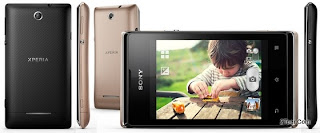
Sony Xperia E Dual C1605 C1604 Hard Reset

Thursday, November 28, 2013

To perform Hard Reset on this Xperia E, you just need to make sure that all the data has already been backuped
image source

Reset Via Settings
  1. Select Apps from yourHome screen
  2. Tap Settings 
  3. Tap Backup & reset.
  4. Tap Factory data reset 
  5. Tap Reset phone.
  6. Tap Erase everything.
To avoid permanent damage to your device, do not restart your device while a reset procedure is underway.
Warning! All data will be erased from device memory, including system and application data, settings and downloaded applications. Back up your important data.  The device will restore to factory settings.
Performing Soft Reset
If your phone hangs or does not responding, try to Press and hold power key about 10 seconds.  It will rebooting automatically.  Or try to remove and re insert the battery and SIM Card.
Read More..

Samsung S6500 Hard Reset

Wednesday, November 27, 2013

Before Hard Reset Bakup Your Data.
S6500 Hard reset

vol up + vol down + home + power.
Read More..

Samsung 18150 Hard Reset Solved Too Many Pattern Attemps Problem Solution

Monday, November 25, 2013

Samsung Galaxy Wonder I8150 correct way for Hard Reset Problem: Too many pattern attempts.

Procedures:

* Press and Hold "volume Up" and "Home" buttons and press power on, wait until the screen display like this.

* Press "left soft" key to display "Android System Recovery Utilities"
* Select "wipe data/factory reset" by pressing "volume down" key
* Press "Home" button to select.
* Press "Volume Dow" key to select "Yes"
* Press "Home" button again and wait until finished


You are now completely reseted the phone back into his factory settings
Read More..

Samsung Glaxy i7500 Hard Reset

Wednesday, November 20, 2013

Samsung Glaxy i7500 Hard Reset

undefined
1 - Hold the Volume key (-) to Low (1) 

2 - Hold the SEND key (button to call) (2) 

3 - Hold the POWER button (3) 

4 - Hold the buttons until expression appears bootmode ... 

5 - Wait until the warning appears (is a red triangle with a fulcrum of a Handheld). 

6 - Hold the Menu button (4) 

7 - Wait until the phone is restarted
Read More..