

Showing posts with label problem. Show all posts
Showing posts with label problem. Show all posts
BlackBerry 9000 Red Light Problem Repair Solution
Thursday, March 6, 2014
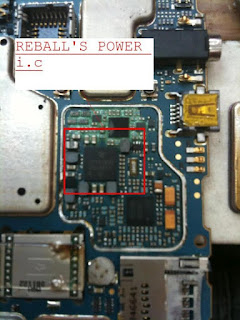
BlackBerry 9000 Red Light Problem Repair Solution
BlackBerry 9000 Red Light Problem
BlackBerry 9000 Red Light Solutins
BlackBerry 9000 Red Light Jumper Ways
iPhone 5 Speaker Ringer Problem Solution With Jumper Ways
Sunday, February 16, 2014

Hardware - iPhone 5 Speaker /Ringer Problem Solution With Jumper Ways
iPhone 5 Speaker /Ringer Problem Solution With Jumper Ways Repairing
Nokia N8 Water Damage Shorted Problem Solution
Thursday, February 6, 2014

Nokia N8 Water Damage Shorted Problem Solution
Nokia N8 Water Damage Shorted Problem
Nokia N8 Water Damage Shorted Solution
Nokia N8 Water Damage Fully Shorted
Nokia E75 Sim Card Not Detected Problem Solution
Saturday, December 21, 2013

Nokia X3 02 Touch Problem Solution
Friday, December 20, 2013

Nokia C2 01 Keypad IC Problem
Thursday, December 19, 2013
Nokia C2-01 Keypad
 Nokia C2-01 Keypad Problem Solution By Changing Z2550 IC.
Nokia C2-01 Keypad IC Problem
Nokia C2-01 Keypad IC Problem
Nokia 2710 Mic Problem Solution
Tuesday, December 17, 2013

Nokia 2710 Mic Ways Jumper
Nokia C3 01 Touch Sensor Problem Solution
Thursday, December 12, 2013

Nokia C3-01 Touch Ic Problem Solution
Sony W980 Mic Problem Solution
Wednesday, December 11, 2013
Sony W980 Mic Problem Solution
Blackberry 8520 Cross Battery Sign Problem Solution
Tuesday, December 10, 2013
Blackberry 8520 Cross Battery Sign Problem Solution


Samsung 18150 Hard Reset Solved Too Many Pattern Attemps Problem Solution
Monday, December 9, 2013
Samsung Galaxy Wonder I8150 correct way for Hard Reset Problem: Too many pattern attempts.
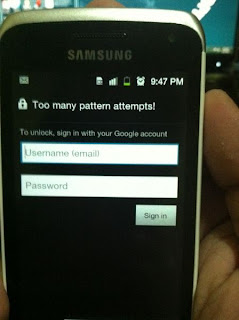
Procedures:
* Press and Hold "volume Up" and "Home" buttons and press power on, wait until the screen display like this.
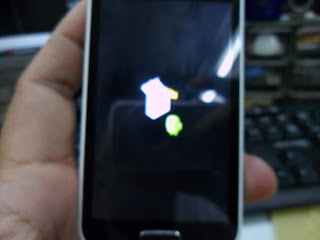
* Press "left soft" key to display "Android System Recovery Utilities"
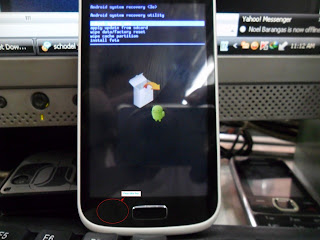
* Select "wipe data/factory reset" by pressing "volume down" key
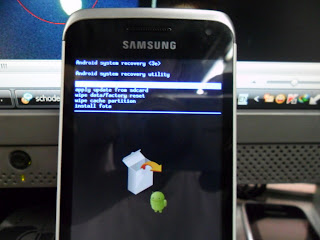
* Press "Home" button to select.
* Press "Volume Dow" key to select "Yes"
* Press "Home" button again and wait until finished
You are now completely reseted the phone back into his factory settings
* Press "Volume Dow" key to select "Yes"
* Press "Home" button again and wait until finished
You are now completely reseted the phone back into his factory settings
Karbonn K7 Hansfree Option Problem Solution
Sunday, December 8, 2013
Karbonn Mobile K7 Always Shows Handsfree Mode Option
Try This Jumper Trick To Solve This Problem As Shown In Diagram
 Karbonn K7 Handsfree Problem Solution
Try This Jumper Trick To Solve This Problem As Shown In Diagram
Sony Ericsson K790 K800i Joystick Problem Solution
Saturday, December 7, 2013
Sony Ericsson K790, K800i Joystick Problem Solution


Samsung Gt s5300 Charging Problem Solution
Tuesday, December 3, 2013
Samsung Gt-s5300 Charging Problem Solution

Samsung gt-s5300 Not Charging
Nokia X3 02 Touch Problem Solution
Monday, December 2, 2013
Nokia C3 01 Touch Sensor Problem Solution
Sunday, December 1, 2013
Nokia C3-01 Touch Ic Problem Solution
Asha 302 Battery Connector Ways Problem Solution
Friday, November 29, 2013
Nokia Asha 302 Battery Connector Ways Jumpers
Here Are Nokia Asha 302 Battery Connector Ways Problem Solutions. Please Observe Carefully.


Sonyericsson G502 Lcd Light Problem Solution
Tuesday, November 26, 2013
Sony Ericsson G502 Dispay Light Problem Solution
 Sonyericsson G502 Display Light Solution Diagram
Change L4201 4,7uh Change v4200 if low light check v420+
Change L4201 4,7uh Change v4200 if low light check v420+

Subscribe to:
Posts (Atom)


