Showing posts with label pattern. Show all posts
Showing posts with label pattern. Show all posts
LG P705 Pattern Code Unlock Hard Reset
Sunday, December 22, 2013
LG P700 Hard Reset Google Account Remove Tip.
 1. When the phone is switched off, press
and hold the Volume down key +
Power key with your left hand.
2. When the LED on the bottom of the phone
lights up, touch and hold the Menu key
with your right hand. You need to do this
immediately, before the screen displays the
LG logo. Make sure your left hand is still
holding the Volume down and Power keys.
Then release the power key at vibration time.
3. When the LG logo is displayed on the
screen, continue to hold the keys for
around 2 seconds, and then release all
them at the same time, before the LG
logo disappears.
Leave your phone for at least a minute while
the hard reset is carried out. You will then be
able to switch your phone back on
and hold the Volume down key +
Power key with your left hand.
2. When the LED on the bottom of the phone
lights up, touch and hold the Menu key
with your right hand. You need to do this
immediately, before the screen displays the
LG logo. Make sure your left hand is still
holding the Volume down and Power keys.
Then release the power key at vibration time.
3. When the LG logo is displayed on the
screen, continue to hold the keys for
around 2 seconds, and then release all
them at the same time, before the LG
logo disappears.
Leave your phone for at least a minute while
the hard reset is carried out. You will then be
able to switch your phone back on

Samsung 18150 Hard Reset Solved Too Many Pattern Attemps Problem Solution
Monday, December 9, 2013
Samsung Galaxy Wonder I8150 correct way for Hard Reset Problem: Too many pattern attempts.
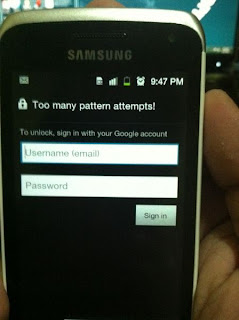
Procedures:
* Press and Hold "volume Up" and "Home" buttons and press power on, wait until the screen display like this.
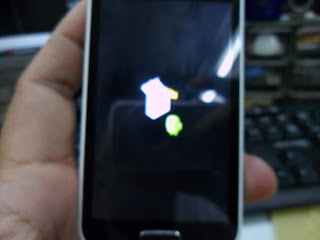
* Press "left soft" key to display "Android System Recovery Utilities"
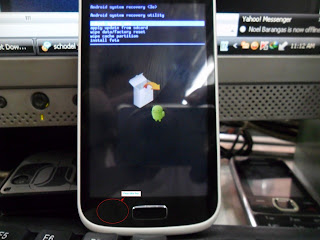
* Select "wipe data/factory reset" by pressing "volume down" key
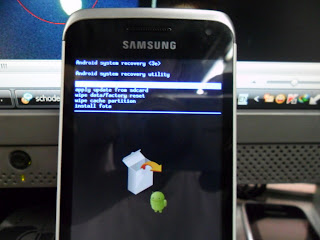
* Press "Home" button to select.
* Press "Volume Dow" key to select "Yes"
* Press "Home" button again and wait until finished
You are now completely reseted the phone back into his factory settings
* Press "Volume Dow" key to select "Yes"
* Press "Home" button again and wait until finished
You are now completely reseted the phone back into his factory settings
Samsung 18150 Hard Reset Solved Too Many Pattern Attemps Problem Solution
Monday, November 25, 2013
Samsung Galaxy Wonder I8150 correct way for Hard Reset Problem: Too many pattern attempts.
Procedures:
* Press and Hold "volume Up" and "Home" buttons and press power on, wait until the screen display like this.
* Press "left soft" key to display "Android System Recovery Utilities"
* Select "wipe data/factory reset" by pressing "volume down" key
* Press "Home" button to select.
* Press "Volume Dow" key to select "Yes"
* Press "Home" button again and wait until finished
You are now completely reseted the phone back into his factory settings
* Press "Volume Dow" key to select "Yes"
* Press "Home" button again and wait until finished
You are now completely reseted the phone back into his factory settings
Lava Iris 501 Pattern Lock Problem Solution
Sunday, November 17, 2013
Lava 501 Hard Reset To Default Settings
Pattern Lock Too Many Attempts Problem Solution.
 Power Off The Mobile Then Press Volume Up And Power Button
Android Logo Will Show On Screen Press Home Button
Select Wipe Data/Factory Reset
Wait For Completing Procedure
Reboot Your Mobile Now
Pattern Lock Too Many Attempts Problem Solution.
Android Logo Will Show On Screen Press Home Button
Select Wipe Data/Factory Reset
Wait For Completing Procedure
Reboot Your Mobile Now
MOTOROLA Droid A855 Too Many Pattern Attempt Done By Hard Reset
Thursday, November 14, 2013

Problem;Too Many Patter Attempt...
Solution; Hard Reset
Procedure;
1.Slide The PHone To See The Keypad
2.Hold The Letter X Then Press The Power ON THen Wait
3.After To See This Logo Press Camera Button And Volume Key Until You See The Selection Text
Select Wipe Date Factory Reset
4.Select Delete All Data Wait To Show Completed
5.Reboot System Done
Motorola Droid Hard Reset - YouTube
Subscribe to:
Posts (Atom)


