Showing posts with label many. Show all posts
Showing posts with label many. Show all posts
Samsung 18150 Hard Reset Solved Too Many Pattern Attemps Problem Solution
Monday, December 9, 2013
Samsung Galaxy Wonder I8150 correct way for Hard Reset Problem: Too many pattern attempts.
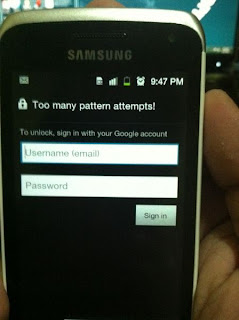
Procedures:
* Press and Hold "volume Up" and "Home" buttons and press power on, wait until the screen display like this.
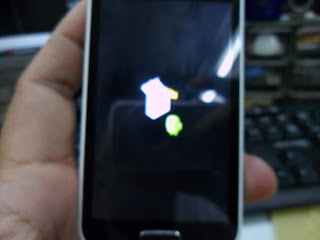
* Press "left soft" key to display "Android System Recovery Utilities"
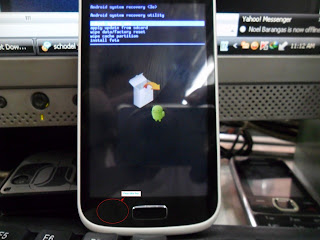
* Select "wipe data/factory reset" by pressing "volume down" key
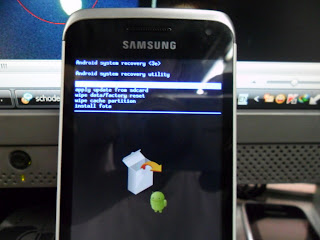
* Press "Home" button to select.
* Press "Volume Dow" key to select "Yes"
* Press "Home" button again and wait until finished
You are now completely reseted the phone back into his factory settings
* Press "Volume Dow" key to select "Yes"
* Press "Home" button again and wait until finished
You are now completely reseted the phone back into his factory settings

Samsung 18150 Hard Reset Solved Too Many Pattern Attemps Problem Solution
Monday, November 25, 2013
Samsung Galaxy Wonder I8150 correct way for Hard Reset Problem: Too many pattern attempts.
Procedures:
* Press and Hold "volume Up" and "Home" buttons and press power on, wait until the screen display like this.
* Press "left soft" key to display "Android System Recovery Utilities"
* Select "wipe data/factory reset" by pressing "volume down" key
* Press "Home" button to select.
* Press "Volume Dow" key to select "Yes"
* Press "Home" button again and wait until finished
You are now completely reseted the phone back into his factory settings
* Press "Volume Dow" key to select "Yes"
* Press "Home" button again and wait until finished
You are now completely reseted the phone back into his factory settings
MOTOROLA Droid A855 Too Many Pattern Attempt Done By Hard Reset
Thursday, November 14, 2013

Problem;Too Many Patter Attempt...
Solution; Hard Reset
Procedure;
1.Slide The PHone To See The Keypad
2.Hold The Letter X Then Press The Power ON THen Wait
3.After To See This Logo Press Camera Button And Volume Key Until You See The Selection Text
Select Wipe Date Factory Reset
4.Select Delete All Data Wait To Show Completed
5.Reboot System Done
Motorola Droid Hard Reset - YouTube
Subscribe to:
Posts (Atom)


